Capabilities | Supported File Formats |
| - Nastran: BLK, PCH, OP2, OP4
|
- Finite element result processing
| - I-deas, NX: UNV, ADF (AFU, ATI, ASH)
|
| |
| - Femap: NEU, direct access via COM
|
| |
| |
| |
- Large Model and Result Visualization
| |
IMAT (Interface between MATLAB®, Analysis, Test) is a suite of utilities offered by ATA Engineering, Inc. which facilitates data 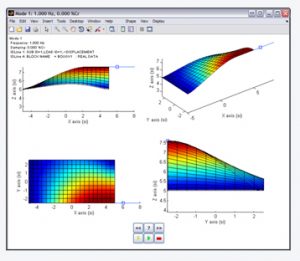 sharing between MATLAB, analysis tools, and test software. The IMAT Toolbox provides a framework for easily importing FEA simulation data and measured test data into the MATLAB environment to access its versatile programming and mathematical strengths.
IMAT+FEA™ offers significant additional functionality that extends IMAT’s capabilities into Simulation. With IMAT+FEA you can work with a much broader range of data from different analytical solvers and utilize the significant strength and capabilities provided by IMAT. It provides the ability to interface with Nastran, Abaqus, and Femap, in addition to I-deas. The imported data is placed into the IMAT data types, so it is easy to use in Matlab, and all of the existing IMAT functionality is readily available.
IMAT+Modal™ offers significant additional functionality that extends IMAT’s capabilities for the modal test engineer. The Genetic Algorithm (GA) for Accelerometer Placement will optimally select accelerometer locations for a modal vibration test. TAMKIT™ provides procedures for selecting the instrumented DOF and for reducing the FEM matrices to these DOF. Modal Test Kit, or MTK™, contains routines that are useful when performing modal survey tests. These routines include methods for sensor and 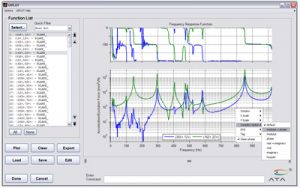 exciter placement, extracting modes from test data, verifying shape extractions through FRF synthesis comparisons, providing shape independence and completeness checks, and other useful routines. OPoly, a Laplace and z-domain orthogonal polyreference modal parameter estimation utility, is a dramatic improvement over the classic polyreference technique.
IMAT+Signal™ extends IMAT’s functionality into signal processing, which in general encompasses processing time domain data into the frequency domain. In addition to command-line functions for tasks such as computing power spectral density (PSD) and cross-spectral density (CSD) functions from time histories, computing frequency response functions (FRFs), and time-domain filtering, IMAT+Signal also provides GUIs that greatly simplify the process. SPFRF™ provides a fully functional GUI for converting time histories to FRFs, and spVIEW facilitates viewing and comparing different measurement datasets in the time and frequency domains. RTK™ provides a GUI that facilitates the analysis and order tracking of rotational events, using the Vold-Kalman filtering technique.
Contact us today for a free 30 day trial license of any IMAT products.
Additional Information
| Prerequisites and Supported Platforms |
| IMAT only requires core MATLAB to function. A few IMAT imat_fn methods (filterf and filteri) require the Signal Processing toolbox, as does the RTK user interface in IMAT+Signal. In addition, the imat_fn methods for window generator (window) and function decimation (decimate) are enhanced with additional functionality if the Signal Processing toolbox is available but will work without it. More specifics can be found in the IMAT documentation. IMAT requires Sentinel RMS license server version 9.7 or newer. |
| Where Can I Get IMAT? |
For product information and pricing, please email us or contact one of ATA’s resellers near you:| USA Resellers | International Resellers | | | | | | |
You can download IMAT by clicking on the appropriate link below. The IMAT download is password-protected. If you are a current customer, please email us to receive the password. You will also need the Sentinel RMS license server to run IMAT. Older versions of IMAT, IMAT+FEA, IMAT+Modal, IMAT+Signal: ATA has previous versions of IMAT available that work with older versions of MATLAB and Windows. Please contact us regarding your specific request in these situations. In your comments, please be sure to list operating system specifications as well as MATLAB version. |


 IMAT is a staple at ATA Engineering, written specifically to allow our advanced engineering services team to leverage the flexibility of MATLAB for each unique project without reinventing common project challenges like importing raw .OP2 results, performing FFTs, and plotting engineering data such as frequency response functions. Contact us today for a free 30 day trial to see if IMAT is right for you.